# Everything you ever wanted to know about Gmail draft inline images and Google Apps Script but were afraid to ask
A common workflow solution in Google Apps Script is to use a Gmail draft message as a template for sending emails. For the user the benefit is they can draft a message in a familiar environment adding formatting without having to worry about writing HTML. This is the model I chose to use in the ‘[Create a mail merge using Gmail and Google Sheets](https://developers.google.com/workspace/solutions/mail-merge)’ example in the Google Workspace Solutions Gallery.
## Problem
So here’s the problem - using the draft as a template generally works well but when you call [`GmailApp.sendEmail()`](https://developers.google.com/apps-script/reference/gmail/gmail-app#sendemailrecipient,-subject,-body,-options) or [`MailApp.sendEmail()`](https://developers.google.com/apps-script/reference/mail/mail-app#sendEmail(String,String,String,Object)) you are not sending the actual draft message, instead you are constructing a new email setting parameters such as `subject`, `htmlBody` and `attachments`.
### Anatomy of Gmail images
The tricky bit is when you want to include images as the user can add these to the message in different ways: inserting from Google Photos; an upload; web address (url); or copy/paste:
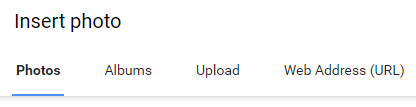Gmail image insert optionsWhen an image is inserted by URL or copy/pasted from a publicly accessible source, such as a Google Doc that has been published to the web, Gmail will keep the reference to the image source but proxy it via one of its public content servers (googleusercontent.com). For example, if I insert an image by web address for a ‘chubby cat’ on Wikimedia Commons with the url:
```
https://upload.wikimedia.org/wikipedia/commons/thumb/7/77/Chubby_Cat.jpg/320px-Chubby_Cat.jpg
```
In the sent email it is referenced as:
```
 ```
If instead images are uploaded or copy/pasted from a private source to the Gmail draft when `.sendEmail()` is used an `inlineImages` object is required to handle these inline images. Below is the [excerpt from the `GmailApp.sendMail()` documentation](https://developers.google.com/apps-script/reference/gmail/gmail-app#sendemailrecipient,-subject,-body,-options):
| Name | Type | Description |
|---|---|---|
| `htmlBody` | `String` | if set, devices capable of rendering HTML will use it instead of the required body argument; you can add an optional `inlineImages` field in HTML body if you have inlined images for your email |
| `inlineImages` | `Object` | a JavaScript object containing a mapping from image key (`String`) to image data ([`BlobSource`](https://developers.google.com/apps-script/reference/base/blob-source.html)); this assumes that the `htmlBody` parameter is used and contains references to these images in the format `img src="cid:imageKey"` |
### The image `Content-ID` (`cid`)
In the case of the ‘chubby cat’ image inserted from Google Photos the Gmail draft `htmlBody` already includes a `cid` references:
```
 ```
So if we are copying the `htmlBody` of the draft to use in `.sendMail()` our `inlineImages` object would look like this, where `BlobSource` is the appropriate image data:
```
GmailApp.sendEmail({
to: 'recipient@example.com',
subject: 'Chubby Cat',
htmlBody: 'inline chubby cat images!',
inlineImages:
{
ii_kl736chs6: BlobSource
}
});
```
When we make our request for the Gmail draft we can also get the inline attachments using the [`.getAttachments(options)`](https://developers.google.com/apps-script/reference/gmail/gmail-message#getAttachments(Object)) method. This returns an array of image data objects as `BlobSource`:
```
GmailMessage.getAttachments({includeInlineImages: true, includeAttachments: false})
```
### The `cid` kicker
Now here’s the kicker [`GmailAttachment[]`](https://developers.google.com/apps-script/reference/gmail/gmail-attachment) doesn’t have a method to return the appropriate `cid` **AND** you can’t rely on the array order as the returned `GmailAttachment[]` is constructed in the order the user added images to the draft, not the order that they appear in the message. I’ve updated a [related Google Apps Script issue ticket](https://issuetracker.google.com/issues/36765267#comment7), which you can star for email updates.
## Solution
### Option 1 - theoretical solution
Instead of the `GmailApp` Service you could use the Gmail API [`users.drafts.get`](https://developers.google.com/gmail/api/reference/rest/v1/users.drafts/get) method and work with the response (here is a [Stack Overflow answer](https://stackoverflow.com/a/42868265/1027723) for doing this in Javascript that could be used in Apps Script). Once you extract the `attachmentId` you would then have to build your own method for calling [`users.messages.attachments.get`](https://developers.google.com/gmail/api/reference/rest/v1/users.messages.attachments/get) and storing the inline images returned as blobs.
### Option 2 - the alt/name fudge
While [`GmailAttacment[]`](https://developers.google.com/apps-script/reference/gmail/gmail-attachment) doesn’t include any `cid` data there is a [`.getName()`](https://developers.google.com/apps-script/reference/gmail/gmail-attachment#getname) method that returns the image filename. The filename is useful because the Gmail draft uses this in the `alt` element:
```
```
**Important:** It is possible for a Gmail draft to have duplicate filenames for inline images in the same message. This can happen with copy/paste or uploading more than one image with the same filename. As such you might want to throw an error when duplicate image filenames are detected.
There are various code samples for extracting the `cid` and `alt` data from Gmail draft messages. Below (or [in this gist](https://gist.github.com/mhawksey/f01cd9faa6cb2325e0f3f449ac0e6005) if you are reading via RSS) is my code based on this [answer on Stack Overflow from Andras Sztrokay](https://stackoverflow.com/a/65813881/1027723):
## Summary
So there you go everything you ever wanted to know about Gmail draft inline images and Google Apps Script but were afraid to ask. If you have a better solution for handling inline images from Gmail drafts I would love to hear it. I hope you found this post useful and please feel free to incorporate it into your own Apps Script projects.